
10 Levels of The CAGED System: Fretboard Visualisation 101

The CAGED System

In this post I’ll be discussing and demonstrating 10 levels of The CAGED System. CAGED has revolutionised my approach to the guitar beyond what I could have possibly imagined.

When I first discovered CAGED, I thought that it was just a beginners tool. It wasn’t until one of my guitar heroes emphasised how important it is that I took it seriously, and I hope that I’m able to relay that emphasis to you today!

The order in which I present the 10 levels does not reflect how I recommend you to practice The CAGED System, but instead it is designed to demonstrate the increasing complexity that can be achieved by learning The CAGED System.

For a structured and systematic practice plan of how to practice CAGED, see my CAGED Fretboard Visualisation Masterclass. Now, let’s delve into those 10 levels!

Level 1 – The CAGED Shapes

This level focuses on building and navigating between the 5 core CAGED shapes, which are based on familiar open chord shapes.

The CAGED shapes are designed to be transposable shapes, which can be put together by replacing the nut (open strings) of each open chord with the index finger.

Below is an example of each CAGED shape transposed to a D major chord. The yellow notes represent the notes you should play. Grey notes are neighbouring notes that belong to the triad.

C Shape:

A Shape:

G Shape:

E Shape:

D Shape:

Level 2 – Minor CAGED

In this level, we minorise the major CAGED shapes by flattening all 3rds. It’s noticeably more difficult to play these shapes because the finger positions can be awkward, so whilst it’s important to be aware of the notes you should play, it’s best to omit the notes that are difficult to lay your fingers on.

Level 3 – Basic Chord Progressions

Now you know the CAGED shapes, you can start using the CAGED shapes in a musical setting!

Here’s a challenge for you to try. Take a familiar chord progression that you would likely play using barre chord shapes. Now try to transpose those chords to one single position of the neck.

In the video, I demonstrate a I-IV-vi-V progression in E major using various CAGED voicings. Each of the chords are played within a 5-6 fret span of the neck. This will not only help build your chord vocabulary, but will later become very helpful when improvising through arpeggios and scales 😉

This level emphasises practical application.

Level 4 – Triad Arpeggios:

Here, we move from chords to single-note melodies built from the triad tones. Remember those grey notes from the diagrams in Level 1? Both Grey and Yellow notes from the diagrams show you the notes of each CAGED position that belong to the corresponding triad arpeggio (D major).

Once you’re confident playing these notes from each position, both ascending and descending, you’ll begin adding more melodic depth to your playing.

Level 5 – Triad Chords

Now that you can identify the triad arpeggios that belong to each position, you can begin grouping the notes from neighbouring strings together to form 3-note (Triad) chords. This is what’s known as closed voiced triads.

This is where your chord vocabulary will begin to grow exponentially, which is very exciting!

Level 6 – Spread Voiced Triads

We explore more advanced triad voicings that are spread across non-consecutive strings. This can be achieved by taking the middle note from closed voiced triads, and playing it an octave higher or lower.

Music that comes to mind when I think about spread voiced triads is the opening of Cliffs Of Dover Live from Austin Texas (0:00 – 0:50 in this video):

This technique is great for chord-melody playing and adds a touch of sophistication to your arrangements.

Level 7 – Extended Arpeggios

Building on the foundation of triads, we can begin to add extensions like the 7th, 9th, 11th, and 13th degrees of chords. This level introduces new chord flavours, and enriches your harmonic vocabulary tenfold!

To achieve this level of playing, it’s important to work from the notes you’re most familiar with – the triad. For example, to find the 11th degree (4th), you should first identify where the 3rd is before moving a whole step up to the 11th/4th degree.

Once you can begin identifying where the extended tones are, you can start to play each of the notes sequentially to form more exciting and colourful arpeggios.

Level 8 – Building Scales

Scales are a small extension beyond the arpeggios. A simple place to start is the major scale, followed by the natural minor scale, but there’s much more to learn beyond this!

Once you become proficient at identifying intervals quickly on the neck, it will become very easy for you to build scales on-the-spot. This is an essential skill for improvisation, especially over more complex harmonic changes.

Level 9 – Extended Chords

Playing notes in sequential order is not nearly as difficult as playing groups of notes together! We’re limited to 4 fingers, and 6 strings, so it’s necessary to make quick decisions about the order of notes, and which notes to omit.

This level requires an understanding of chord construction. In the video provided, I demonstrate chord voicings and accompany them with an improvised melody, showcasing the harmonically rich sounds of extended chords.

Level 10 – Melodic Freedom:

In this final level, you have complete freedom to visualise the guitar neck and play both melody and harmony without a struggle!

CAGED will alleviate the trial and error of finding notes on the neck, and will instead allow you to communicate more effectively from your brain to your fingers 💪

Summary

I hope this demonstration gives you insight into the creative possibilities of the CAGED system. If you’re interested in a structured practice plan on how to master these skills and beyond, consider joining me here on Fretwise for a comprehensive learning experience! Keep practicing and have fun exploring the vast possibilities of the CAGED system!

Positive Grid Bias FX 2 Elite: Overview, Review, and Demo

Positive grid Bias FX 2 Elite

I’m excited to showcase Positive Grid’s most renowned plugin: Bias FX 2 Elite. I’ve been using BIAS FX for almost 10 years now, and it’s been used in all of my singles to date!

In the video above, I’ll take you on a tour of the interface and demonstrate how easy it is to create your own tones. Additionally, I’ll demo some of the factory presets that come with Bias FX 2 and share three of my personal presets for you to download and try out yourself on their Tone Cloud.

Bias FX 2 First Impressions

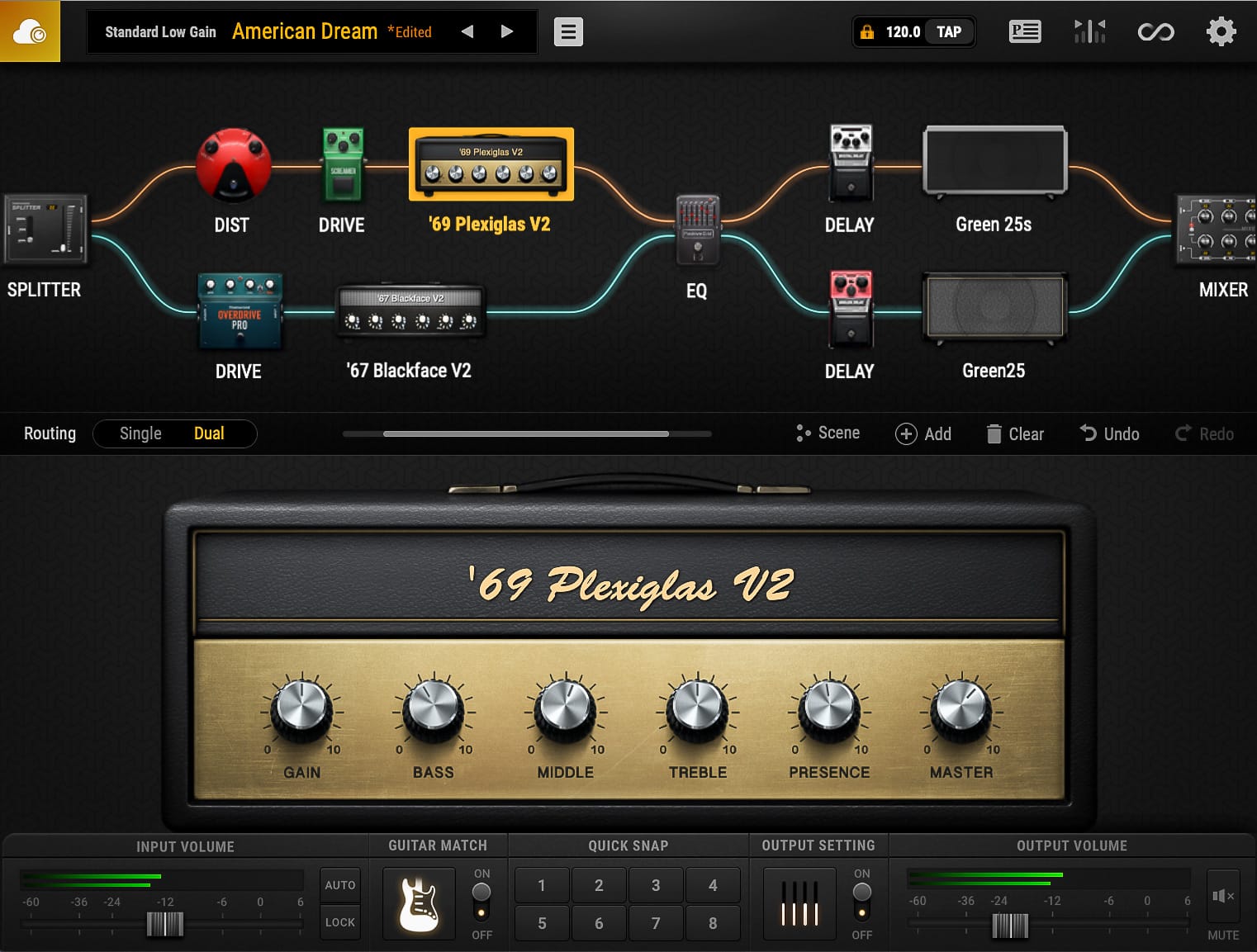
When you open Bias FX 2, you’ll immediately feel welcome with its completely modernised interface. It’s definitely one of the best looking plugins I’ve seen. The interface is mostly operated by dragging & dropping items into the effects chain. It’s easy to filter through countless built in presets covering tones covering everything from Clean to Metal, and even Acoustic and Bass Guitar Effects.

Create Your Own Tones

Bias FX 2 boasts a plethora of gear based on real-world products. Over 100 Amps and loudspeaker Cabinet models, and nearly 150 Effects Pedals & Rack-mount Units. I’m usually the kind of guy that prefers a more concise amount of high quality gear, but all of this gear sounds too good to pass on!

You can fine-tune the settings for each effect piece of gear, and even set the virtual mic placement. Simply drag and drop effects into the chain, change their order, and tweak the sound to your liking.

Features

Aside from the gear, the plugin also has a built in tuner, a looper with recording and exporting features, and a unique “guitar match” feature that allows you to even replicate the sound of other popular guitars!

There’s also a “Tone Cloud” where you can share your own presets, and discover an extensive collection of other user-created presets.

Where to Begin?

You can download a trial of the software for free, so there’s really nothing to lose. I recommend using the factory presets as a starting point and making further adjustments from there. There are countless presets to choose from, and you can even explore additional options on the Tone Cloud.

Where to Find My Patches!

I’ve shared three of my own patches on the Tone Cloud. You can search for “Darryl Syms” to find them. These patches include “Australian Dream”, “Dynamic Bite”, and “High Gain”. Each patch has its unique characteristics and serves as an excellent foundation for your own tone exploration.

I hope you enjoy experimenting with the tones and presets available in Bias FX 2.

Remove Unwanted String Noise From Your Bends And Vibrato

remove unwanted string noise

It’s not uncommon for guitar players to struggle with unwanted string noise when performing phrasing techniques such as bends and vibrato.

In the video lesson provided, I’ll demonstrate effective techniques to help you minimise unwanted string noise in your playing. The key technique you’ll learn is left hand muting, which proves to be one of the best ways to address this issue. Below I have summarised the tips from the video for your reference so you can achieve cleaner, more professional phrasing!

Left Hand Technique

There are multiple methods in which you can employ left hand string muting. Here are just a few tips for you to consider in general practice:

  1. Always touch the string above! Most often with your first finger, but also sometimes with your third. Make sure you touch the string above with the flesh of your finger, not the nail.
  2. If you’re playing chords or arpeggios, you should ensure that the fingers on your left hand are arched to allow room for the strings to ring out. You can achieve this better by moving the thumb down on the back of the neck. If you’re playing a melody however, you’ll want to keep your fingers relatively flat. For this, you’ll want to bring the thumb high and almost over the top.
  3. Use your third finger as the leading finger for bending, while the second and first fingers provide support. Ensure that the first finger is slightly higher than the other two, lightly touching the string above to eliminate noise. By maintaining this finger formation, you can achieve cleaner bends with less background noise.
  4. When performing vibrato with the third finger, make sure to keep your first finger stable and flat so that it is muting the neighbouring strings. The first finger does not need to press down on a fret, but instead it should rest gently on the strings.

Right Hand Technique

Now let’s look at the right hand. It’s good practice to use the palm of your hand to mute the strings above the note you are playing. So, for example, if you are playing the G string, try to rest your palm on the E and A strings. It’s better to use the left hand to mute the D string.

Summary

I hope these tips and exercises help you improve your string bending technique and eliminate unwanted string noise. Remember to practice regularly and pay attention to your hand position and finger formation! By incorporating these techniques into your playing, you’ll achieve cleaner and more controlled bends and vibrato.

Guitar Pro: An Essential Tool for Every Guitarist

Guitar Pro

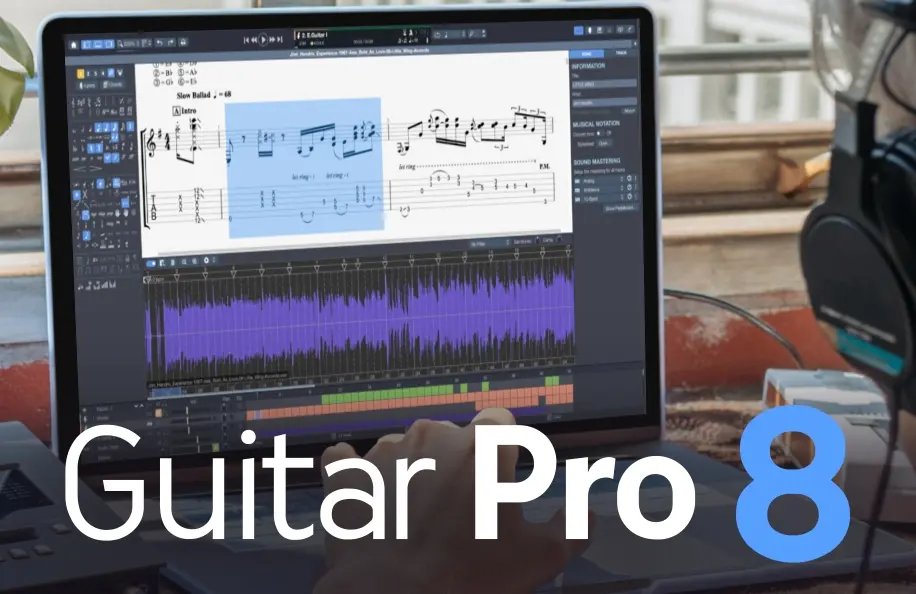
Guitar Pro has been a total game-changer for my guitar practice and music creation workflow. This incredible software packs in a ton of useful features that make it an invaluable tool for guitarists of all levels.

In the video above I give you a detailed overview of the software. The video outlines the features included in Guitar Pro 7.5 since that was the latest version at the time. Below I have recounted the key takeaways. Let’s dive into the awesomeness of Guitar Pro:

1. Flawless Transcription

Guitar Pro allows you to easily transcribe songs and create pro-quality sheet music. No more struggling to write out tabs and notation by hand. Not only do you have the ability to create your own digital tabs, but you can find thousands of free tab downloads of your favourite songs online from places like Ultimate Guitar to get you started.

Not only can you transcribe Guitar in this software, but also Drums, Bass, Piano, Stringed Instruments, and much more!

2. Total Customisation:

You can customise your music with various techniques like slides, bends, vibrato, palm-muted notes, and more. Guitar Pro gives you fine-tuned control over every aspect of your music. You can craft your compositions exactly how you want them to sound.

3. Tab and Standard Notation in One

Guitar Pro displays both tablature and standard notation, making it a great tool for learning how to read music in both formats.

4. Immersive Play Along Experience

Not only can you transcribe and read music in Guitar Pro, but you can also play along with it seamlessly at any tempo. This makes learning and practicing songs incredibly efficient and enjoyable.

5. Built-in Sound Library: Realistic Sound Engine

Guitar Pro has a realistic sound engine that makes MIDI playback sound as real as possible. It adds depth and authenticity to your tabs beyond just numbers and lines!

6. Digital and Organised

With Guitar Pro, everything is consistent and editable. No more handwritten notes with mistakes or inconsistencies; this program ensures accuracy! In the current digital age, Guitar Pro is the best way to future-proof your work.

7. Practice Tools to Maximise Progress:

With practice tools like section looping, playback speed adjustment, and playing along with a metronome, Guitar Pro helps you refine your skills effectively.

The Total Package

Guitar Pro is an invaluable tool for guitarists and musicians of all levels. It’s extremely user-friendly, versatile, and packed with valuable features that enhance your practice, composition, and performance. Whether you’re transcribing, learning songs, or creating your music, Guitar Pro is an essential tool to have in your repertoire!

Not only do I use Guitar Pro as a practice tool but also as a teaching resource. Every Masterclass on my website offers both PDF and Guitar Pro compatible file downloads, making it an excellent tool to have for those learning with me on Fretwise.

Give Guitar Pro a shot today and save 20% using my discount code DARRYL20 at the checkout – you won’t regret it!