Toontrack Superior Drummer 3 Overview & Demo: Is This The Best Drum Plugin?

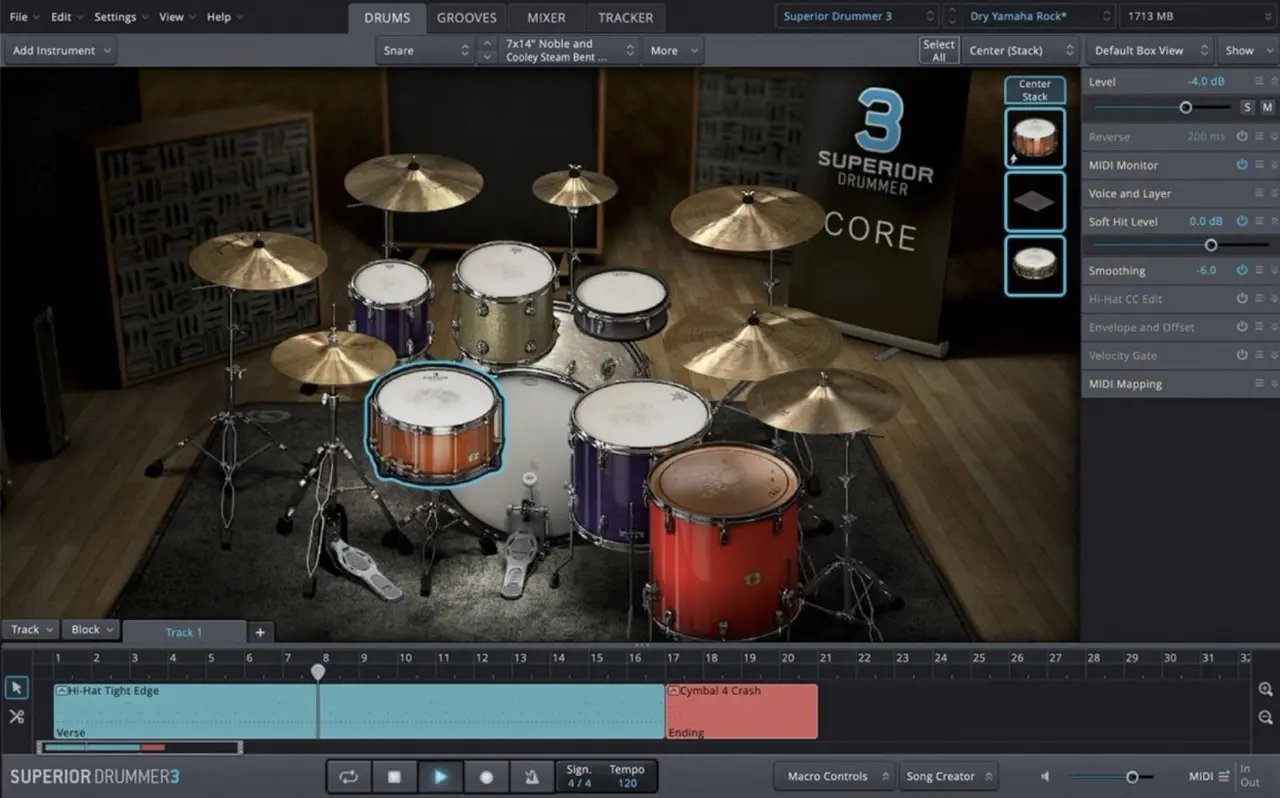
superior drummer 3 software user interface

Toontrack’s Superior Drummer 3 plugin is a top-of-the-line drum plugin, boasting an extensive 300GB+ sample library. With its exceptional sound quality and a wide range of features, this plugin has become an indispensable tool in my music production. The user-friendly interface of Toontrack plugins sets them apart, making them a go-to choice for producers. Get ready to witness the incredible capabilities of this phenomenal plugin as I demonstrate why it’s a game-changer in music production.

Whether you’re a seasoned drummer or have never touched a drumstick in your life, this plugin is designed to empower you in your home studio. With its massive built-in MIDI library and expansive sample pack, you’ll find endless inspiration at your fingertips.

In the video above, I’ll be giving you a firsthand look at the plugin. I’ll demonstrate its incredible sound, guide you through its remarkable features, and take a comprehensive tour that will leave you inspired to integrate its power into your own music production. So let’s dive right in!

First Impressions

When you open the plugin, you’ll see the modern and intuitive interface. It is fully resizable, allowing you to optimise your screen space. The plugin comes with a wide range of drum presets, midi grooves, and mixer presets, giving you countless options to choose from and customise.

The plugin can be used inside your favourite DAW, or even as a standalone program. Inside the interface there are 4 main tabs for you to work through.

#1: The Drums Tab

In this tab you can customise your drum kit. There are plenty of presets that you can choose from to find your sound, and then you can swap out any parts of the kit if you want something more specific.

Beyond the default options, you can fine tune each component further by tweaking elements such as the tuning, attack, release, and much more. Components can even be “doubled up” for a broader sound!

The preset kits include an array of drum kits, electronic kits, world kits, and other percussive sounds such as claps, tamborines, or shakers.

#2: The Grooves Tab

The Grooves tab is where the magic happens. This extensive MIDI library provides a wide variety of drum patterns in different genres and styles. You can filter the results to refine your search, preview the patterns quickly with just one click, and then drag and drop your choices onto the timeline to create your drum arrangement.

Once you’ve added MIDI patterns to the timeline, you can fine-tune them using the MIDI editing features. Double-clicking on a MIDI region opens the Grid Editor, where you can adjust the timing, velocity, and even randomise the performance for a more humanised feel. You can also draw in your own MIDI notes using the Pen Tool or make adjustments with the Nudge function.

The Tap2Find feature in the Grooves tab is particularly useful if you have a specific idea in your head already; you can tap it out, and Superior Drummer 3 will suggest similar MIDI patterns from its library.

#3: The Mixer Tab

The Mixer tab showcases Superior Drummer 3’s built-in mixer. Here, you can adjust the levels, pan settings, and apply effects to individual tracks.

In this tab, you can change microphones, add or remove mics, and even add an array of effects to each track such as EQ, Compression, Reverb, and more. It contains everything you would expect from a good mixer in your DAW. It’s a powerful tool to keep your drum mix tidy and within the plugin itself, but if you would prefer to send each track to your DAW instead, then you can do that too.

#4: The Tracker Tab

In the Tracker tab, you can effortlessly import your own drum tracks and convert them into MIDI data. If you’ve recorded your drum tracks with a microphone, this feature allows you to sync the audio with the plugin’s samples or enhance them further.

This could be helpful if you don’t have a professional studio space. You can record your tracks with a cheap microphone, and let superior drummer handle the rest! Or perhaps you’ve already recorded a decent drum track, but you want to change the sound and depth. The Tracker Tab is a powerful tool for these instances.

Is Toontrack’s Superior Drummer 3 For You?

Superior Drummer 3 is a powerful and versatile plugin that offers incredible sound quality, an expansive MIDI library, and an intuitive workflow. Whether you’re a professional producer or a home studio enthusiast, this plugin offers everything you need to take your productions to the next level.

I’ve been using this drum software since 2020, and it’s without a doubt something that I can recommend with confidence.
Positive Grid Bias FX 2 Elite: Overview, Review, and Demo

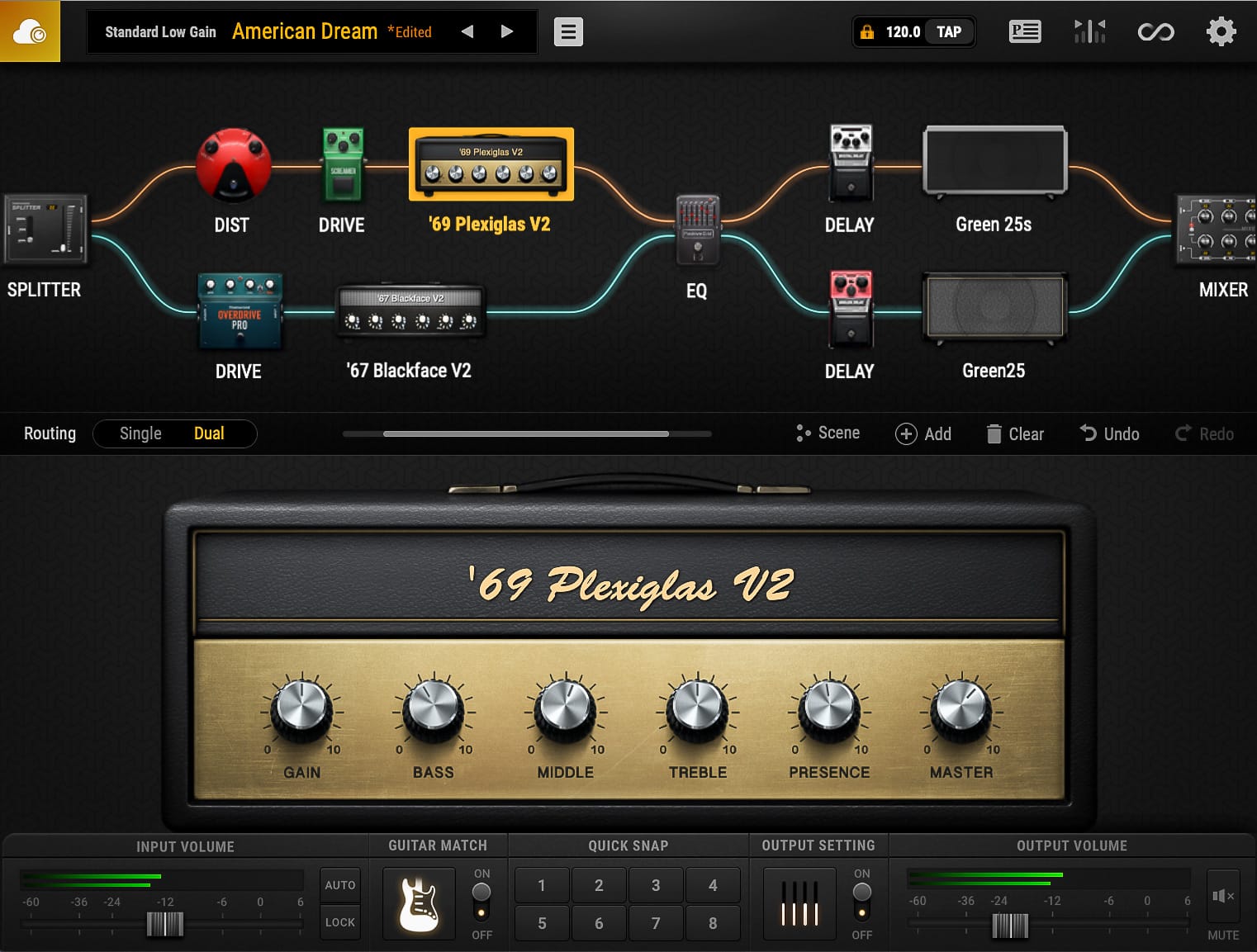
Positive grid Bias FX 2 Elite

I’m excited to showcase Positive Grid’s most renowned plugin: Bias FX 2 Elite. I’ve been using BIAS FX for almost 10 years now, and it’s been used in all of my singles to date!

In the video above, I’ll take you on a tour of the interface and demonstrate how easy it is to create your own tones. Additionally, I’ll demo some of the factory presets that come with Bias FX 2 and share three of my personal presets for you to download and try out yourself on their Tone Cloud.

Bias FX 2 First Impressions

When you open Bias FX 2, you’ll immediately feel welcome with its completely modernised interface. It’s definitely one of the best looking plugins I’ve seen. The interface is mostly operated by dragging & dropping items into the effects chain. It’s easy to filter through countless built in presets covering tones covering everything from Clean to Metal, and even Acoustic and Bass Guitar Effects.

Create Your Own Tones

Bias FX 2 boasts a plethora of gear based on real-world products. Over 100 Amps and loudspeaker Cabinet models, and nearly 150 Effects Pedals & Rack-mount Units. I’m usually the kind of guy that prefers a more concise amount of high quality gear, but all of this gear sounds too good to pass on!

You can fine-tune the settings for each effect piece of gear, and even set the virtual mic placement. Simply drag and drop effects into the chain, change their order, and tweak the sound to your liking.

Features

Aside from the gear, the plugin also has a built in tuner, a looper with recording and exporting features, and a unique “guitar match” feature that allows you to even replicate the sound of other popular guitars!

There’s also a “Tone Cloud” where you can share your own presets, and discover an extensive collection of other user-created presets.

Where to Begin?

You can download a trial of the software for free, so there’s really nothing to lose. I recommend using the factory presets as a starting point and making further adjustments from there. There are countless presets to choose from, and you can even explore additional options on the Tone Cloud.

Where to Find My Patches!

I’ve shared three of my own patches on the Tone Cloud. You can search for “Darryl Syms” to find them. These patches include “Australian Dream”, “Dynamic Bite”, and “High Gain”. Each patch has its unique characteristics and serves as an excellent foundation for your own tone exploration.

I hope you enjoy experimenting with the tones and presets available in Bias FX 2.

Guitar Pro: An Essential Tool for Every Guitarist

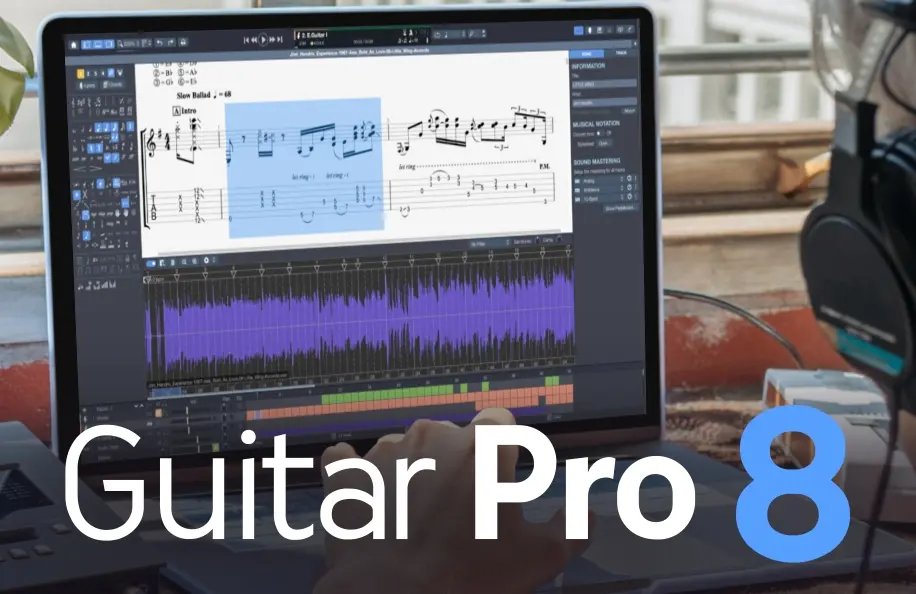
Guitar Pro

Guitar Pro has been a total game-changer for my guitar practice and music creation workflow. This incredible software packs in a ton of useful features that make it an invaluable tool for guitarists of all levels.

In the video above I give you a detailed overview of the software. The video outlines the features included in Guitar Pro 7.5 since that was the latest version at the time. Below I have recounted the key takeaways. Let’s dive into the awesomeness of Guitar Pro:

1. Flawless Transcription

Guitar Pro allows you to easily transcribe songs and create pro-quality sheet music. No more struggling to write out tabs and notation by hand. Not only do you have the ability to create your own digital tabs, but you can find thousands of free tab downloads of your favourite songs online from places like Ultimate Guitar to get you started.

Not only can you transcribe Guitar in this software, but also Drums, Bass, Piano, Stringed Instruments, and much more!

2. Total Customisation:

You can customise your music with various techniques like slides, bends, vibrato, palm-muted notes, and more. Guitar Pro gives you fine-tuned control over every aspect of your music. You can craft your compositions exactly how you want them to sound.

3. Tab and Standard Notation in One

Guitar Pro displays both tablature and standard notation, making it a great tool for learning how to read music in both formats.

4. Immersive Play Along Experience

Not only can you transcribe and read music in Guitar Pro, but you can also play along with it seamlessly at any tempo. This makes learning and practicing songs incredibly efficient and enjoyable.

5. Built-in Sound Library: Realistic Sound Engine

Guitar Pro has a realistic sound engine that makes MIDI playback sound as real as possible. It adds depth and authenticity to your tabs beyond just numbers and lines!

6. Digital and Organised

With Guitar Pro, everything is consistent and editable. No more handwritten notes with mistakes or inconsistencies; this program ensures accuracy! In the current digital age, Guitar Pro is the best way to future-proof your work.

7. Practice Tools to Maximise Progress:

With practice tools like section looping, playback speed adjustment, and playing along with a metronome, Guitar Pro helps you refine your skills effectively.

The Total Package

Guitar Pro is an invaluable tool for guitarists and musicians of all levels. It’s extremely user-friendly, versatile, and packed with valuable features that enhance your practice, composition, and performance. Whether you’re transcribing, learning songs, or creating your music, Guitar Pro is an essential tool to have in your repertoire!

Not only do I use Guitar Pro as a practice tool but also as a teaching resource. Every Masterclass on my website offers both PDF and Guitar Pro compatible file downloads, making it an excellent tool to have for those learning with me on Fretwise.

Give Guitar Pro a shot today and save 20% using my discount code DARRYL20 at the checkout – you won’t regret it!

Positive Grid Spark 40 Amp: Review

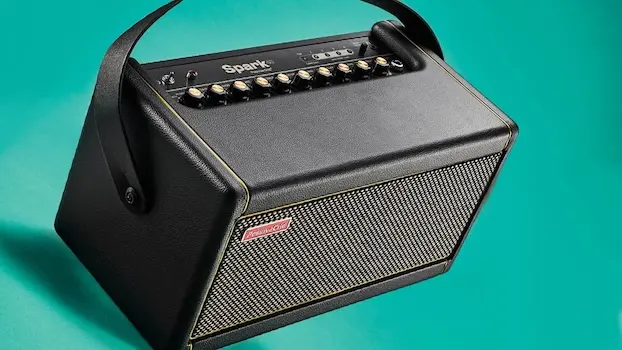
Positive Grid SPARK 40 Amp

The Positive Grid: Spark 40 Amp may look like a small head unit, but it’s actually a powerful 40 watt practice amp that features two speakers in the front! If you’d like a Spark amp review, listen in to the video above for a hands on experience, and multiple demonstrations of what it actually sounds like!

6 Best Features Of The Spark Amp

#1: Smart Band on Demand

When coupled with the free Spark app on iOS or Android, the Spark listens to your playing style and creates drums and bass that play along with you. It’s like having your own smart, virtual band on demand.

Unfortunately, at the time of writing this I was not able to test this feature, but it looks promising and would be an excellent resource for improvisation and impromptu performances.

#2: Play Along with Songs

Using the Spark app, you can play songs directly from YouTube, Spotify, or Apple Music, and the app will even detect the chords for that song. You can then play along at your own pace!

#3: Voice Command

Through the Spark app, you can voice command the amp to play a specific song, provide a backing track, or have your virtual band accompany your performance.

#4: Powered by Bias Engine

The Spark is powered by the Bias engine, offering incredible versatility with sounds, genres, and styles. Using the app and the dials on the unit, you can dial in your favourite tone from various styles. Additionally, the app provides access to Positive Grid’s Tone Cloud, boasting over 10,000 presets for you to explore. You can also share your own custom tones on the Tone Cloud.

#5: Direct Recording

You can connect the Spark 40 directly to your computer or digital audio workstation via USB for high-quality, hassle-free recording. No need for microphones, as you’ll get professional studio tones without any setup complications. It’s essentially an amp with its own built in audio interface!

#6: Instrument Adaptability

Lastly, the Spark isn’t limited to electric guitars. You can also plug in acoustic or bass guitars, and the settings on the unit can be adjusted accordingly. The Tone Cloud offers instrument-specific presets for even more customisation options.

Demonstrations

In the Youtube video attached to this post, I demonstrate the sound of the Spark amp through a microphone. This will give you a better idea of how the Spark amp sounds straight out of the box!